Tilo. Retail, connected.
Sell. Serve. Sorted.
The till for shops, restaurants and bars that do more than sell. Sales, tables, deposits, repairs and the card machine on one iPad, and the back office in your browser.
One till in one shop is free. No card needed to start.
Most tills stop at the receipt. Yours can't.
If you shorten sleeves, resize rings, fix screens or bake to order, the sale is where the job starts. Tilo follows it to the end.
Sold, with the work on it
Add an alteration or a repair to any item, with a note and a ready-by date. A ticket prints for the workroom.
On the board
Every item waiting for work is on a board on the till and in the back office. Tick each job off as it is done.
The customer is told
When the last job on an item is ticked, the customer gets a text or a WhatsApp message saying it is ready.
Collected
Scan the ticket to find the order, take any balance, and mark it collected.
One screen your staff can learn in minutes.
Products on the left, the sale on the right. Sizes, matching pieces and extras without leaving it.
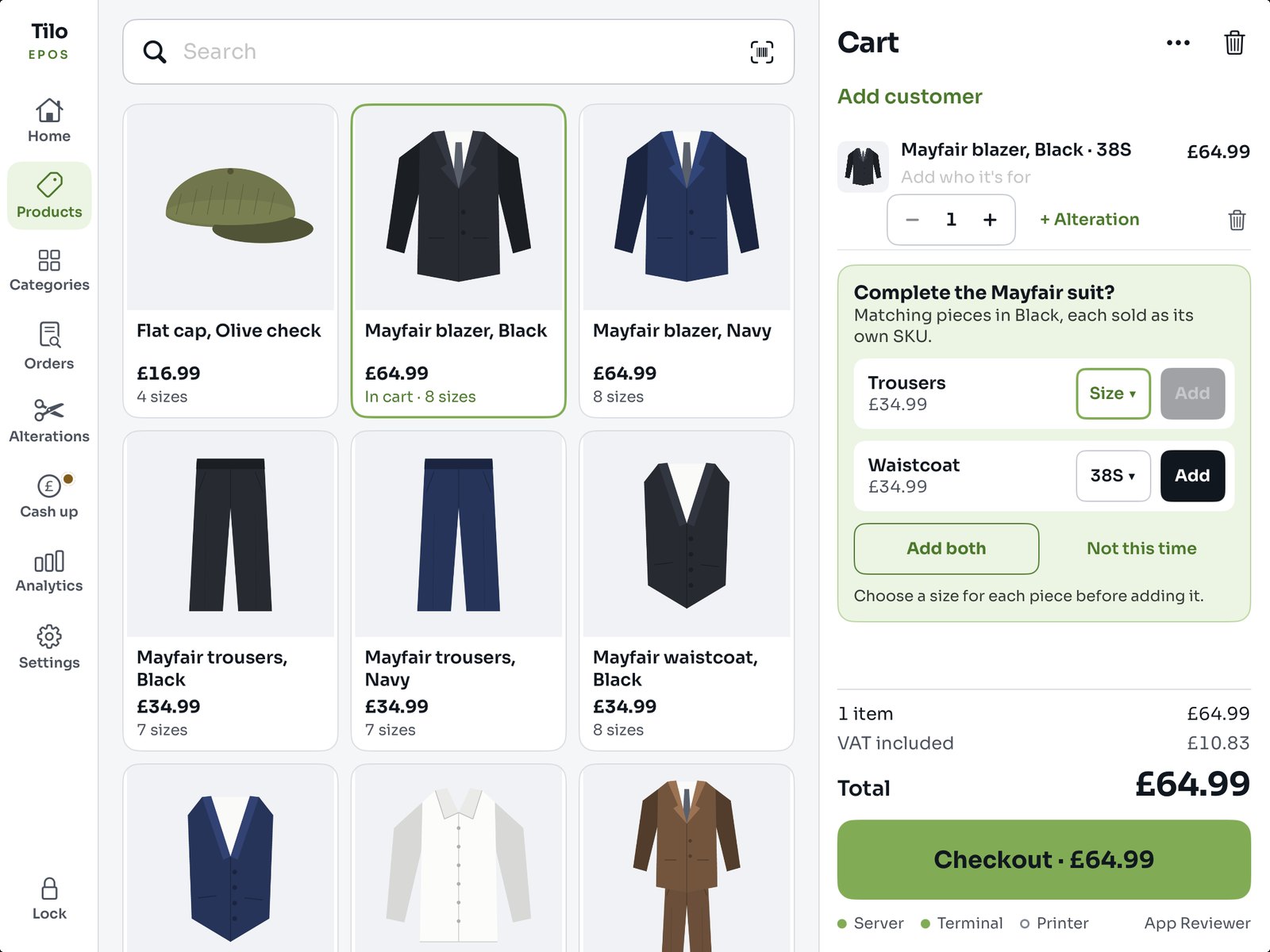
Selling, with the sale beside the products
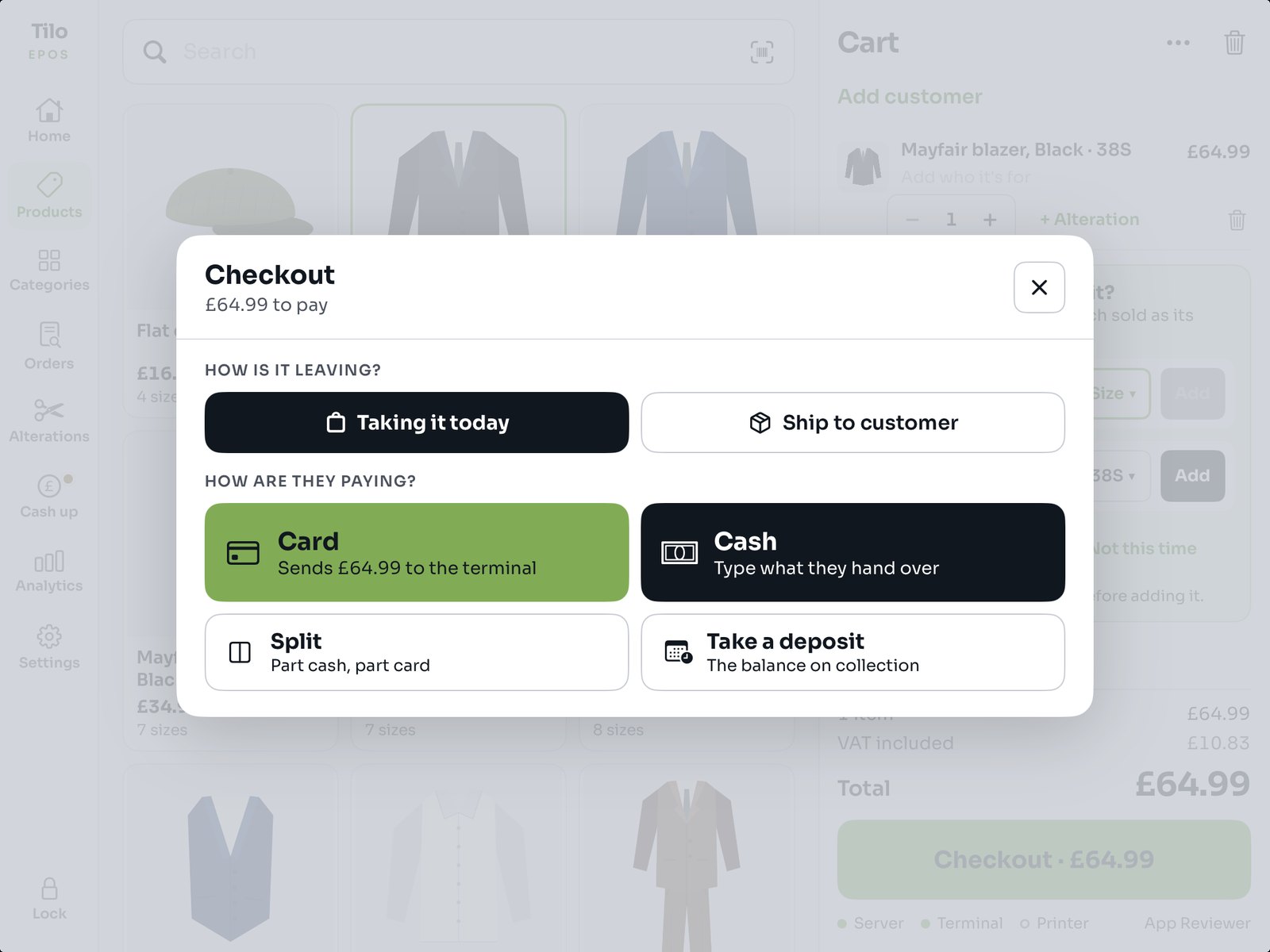
Card, cash, split or a deposit
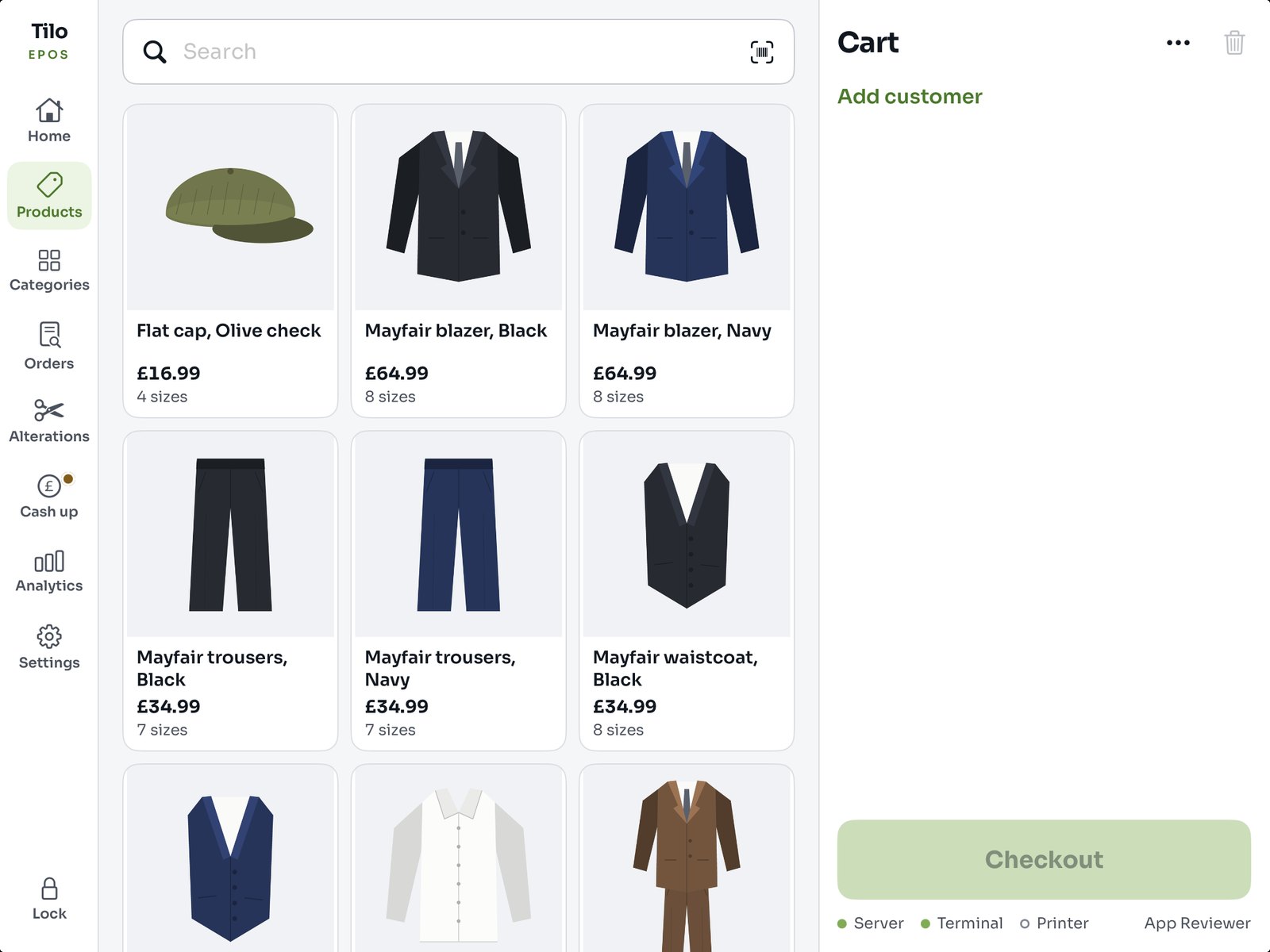
Your whole range, with pictures
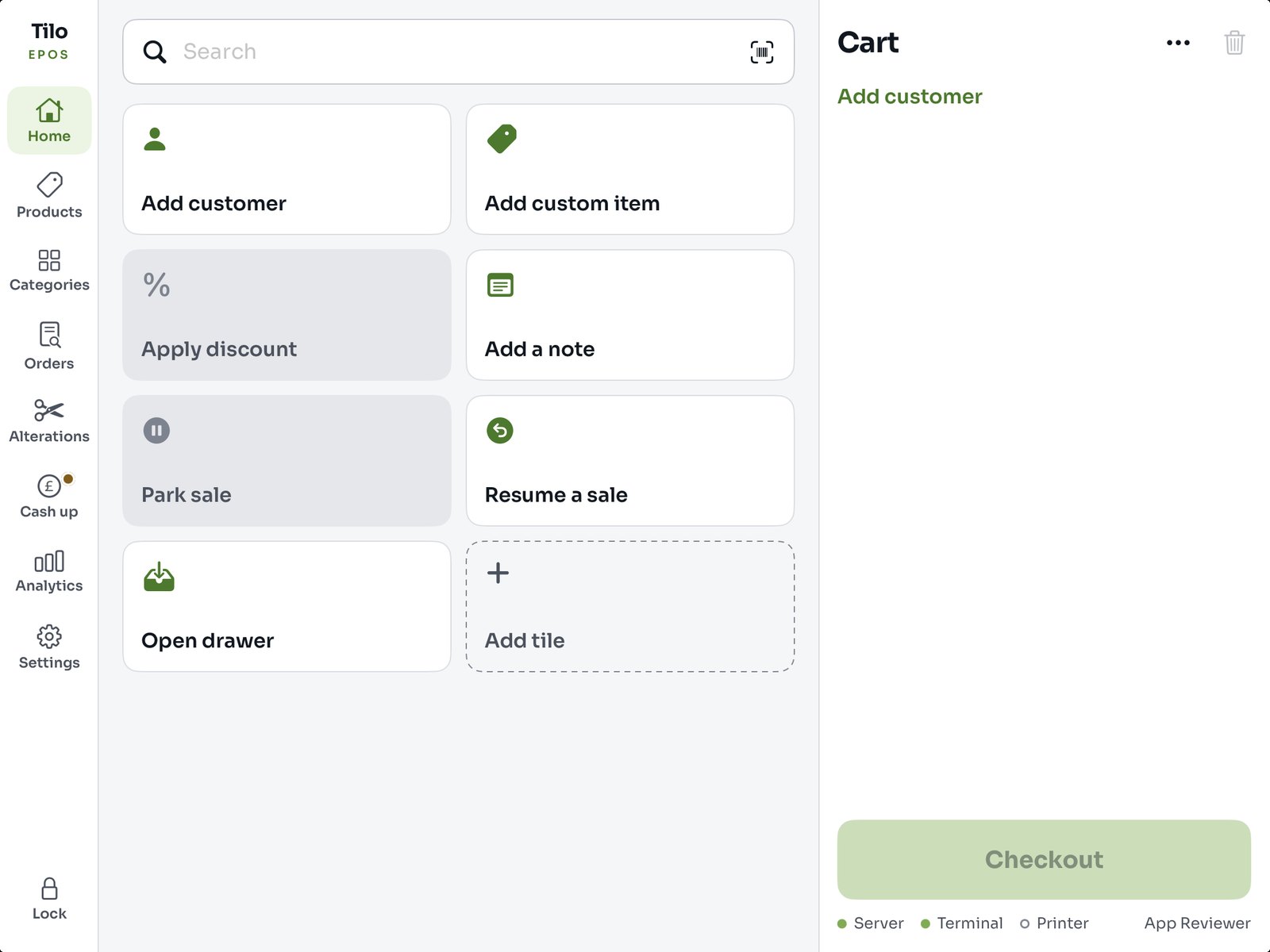
The shortcuts your business uses most
And everything a counter needs.
An iPad at the till and a back office in your browser, set up for the kind of business you run.
Sell
Search or scan, pick a size, take the money. The whole catalogue is on the iPad, so the till keeps finding products when the wifi is slow.
Take deposits
Take part now and the rest on collection. The order waits with the customer's name, number and collection date, and the balance is one tap away when they come back.
Returns and exchanges
Refund to cash or back to the card, or turn the value into credit on a new sale. A manager's PIN can be asked for when it matters.
Tables and a floor plan
Draw your room in the back office. On the till, tap a table to open its order, add each round, move it to another table, and take payment when the guests are ready.
Kitchen and bar tickets
Choose where each part of the menu is made. Saving an order prints the food in the kitchen and the drinks at the bar, and each round prints only what is new.
Your own card machine
Connect your card provider and the amount goes to the reader by itself. Tilo never takes a cut of your sales.
Cash up
Open the drawer with a float, count it at the end of the day, and see what was expected beside what is there.
Staff and permissions
Everyone signs in with a four-digit PIN. Decide who may give discounts, take returns, void a sale or close the till.
Reports
What was taken today, how, what sold and by whom, on the till and in the back office, with every sale kept to look up later.
Receipts your way
Lay out your own receipt and job ticket, print them, or email the receipt as a PDF.
Split the bill
By seat, by person, or equally between however many are paying. Each share can be paid a different way.
Tips and a service charge
A service charge you set goes on by itself and can be taken off. A tip is added on the till, or chosen by the customer on the screen facing them.
Choices and meal deals
The till asks how a product is wanted: which milk, what to leave off, what to add. A set of items can have a price of its own.
Stock and purchasing
For a business with no web shop keeping its stock: count, receive and move it, order from suppliers, and see what needs reordering. Batches and use-by dates for food and drink.
Sell when the internet is down
With no connection the till still takes cash sales and prints receipts, and sends them by itself when it is back.
Appointments and a time clock
Book customers in for a fitting or a visit, with a reminder by text. Staff clock in and out on the till and their hours add up on a timesheet.
What your customers can do
A till is for your staff. These are the parts your customers notice.
Pay the way they like
Card, cash, or part of each. A deposit now and the rest on collection. Klarna, PayPal or Clearpay on their own phone, from a QR code on the till or a link sent to them.
Hear when it is ready
A text or a WhatsApp message the moment their alteration, repair or order is finished, with no phone call from you.
Get their receipt by email
The same receipt you print, as a PDF in their inbox.
Use their web shop codes in the shop
Discount codes and gift cards from your web shop work at the till, and are checked with the web shop as they are used.
Bring it back
A return or an exchange found by scanning the receipt, with the money back to the card, in cash, or as credit on something else.
Have it sent
Pay in the shop and have the order shipped to their address instead of carried home.
See it rung up
A screen facing the customer shows each item with its picture and price as it is added, then asks for a tip, their email or their phone number when you need one.
Order from the table
Guests scan a code at their table, read the menu in their own language, order, and pay the bill from their phone.
Earn and spend points
Loyalty points earned on what they buy and spent as money off, with no card and no app: their phone number is enough.
Connected to what you already use
Tilo works with your own accounts at each of these. You keep your rates and your contracts; Tilo adds no fee on top.
- Card machines
- Stripe Terminal, SumUp, Mollie, Adyen, takepayments. The till sends the amount to the reader.
- Pay on their phone
- Klarna, PayPal, Clearpay. From a QR code on the till, or a link by text or WhatsApp.
- Web shops
- Shopify, WooCommerce, Magento, BigCommerce. Products and stock in, till sales back as orders, discount codes and gift cards at the till.
- Stock and orders
- Linnworks. Products and stock from Linnworks, and till sales sent back as orders.
- Accounts
- Xero, QuickBooks Online, Sage Accounting, Sage 50. Each shop's day for your books: sales and returns by VAT rate, and what was taken by cash and card. Sent to Xero, QuickBooks or Sage Accounting each night, or as a file Sage 50 imports.
- Messages
- Twilio SMS, WhatsApp, Email. Ready-to-collect messages, payment links and emailed receipts.
- Hardware
- Star and Epson receipt printers, Socket Mobile scanners, Cash drawers. Receipts, kitchen and bar tickets, job tickets, and a drawer that opens for cash.
- Screens
- Customer display, Kitchen and bar screens. Any spare tablet, phone or monitor with a browser: one facing the customer, one where the food or the drinks are made.
- Your own software
- Tilo API, Webhooks. Read your sales, products and shops from your own systems with an API key, and be told the moment a sale is paid.
Ready for your trade
Tell Tilo what kind of business you are and it switches on what fits, with starter categories and the usual extras already in place. Change any of it later.
Tailoring and clothing
Sizes, matching pieces, and alterations with a ticket and a ready-by date.
Restaurants
A floor plan, an order on every table, tickets to the kitchen and the bar.
Cafés
Quick sales with extras on each drink, and tables when you want them.
Bars and pubs
Tabs on tables, drinks straight to the bar printer, food to the kitchen.
Jewellers
Repairs, resizing and engraving followed from the sale to collection.
Phone and computer repair
Each repair gets a printed ticket and a ready-by date, is ticked off on the board, and the customer is texted when it is done.
Bakeries
Celebration cakes ordered with a deposit and collected on the day.
Florists
Bouquets at the counter, wedding and funeral flowers ordered ahead.
Shoes and accessories
Sizes on every product, and services at the counter.
Grocery and convenience
A fast till with categories at different VAT rates.
Homeware, gifts, books, toys
Your whole range with pictures, returns, and stock from your web shop.
Something else
Start simple and switch features on as you need them.
Free for one till. Paid plans by the shop.
A paid plan is priced for each shop, with its tills included, and the price includes VAT. Pay monthly, or yearly and get two months free. Change or cancel whenever you like. Tilo never takes a cut of your sales: card payments go through your own provider at the rate you agreed with them.
Free
£0 for good. One till in one shop: selling, returns and exchanges, cash up, your own card machine, and sales reports.
Standard
£19 a shop, each month, £190 a shop, each year. Up to three tills and as many staff as you need in one shop, your web shop connected, and your own receipts.
Advanced
£39 a shop, each month, £390 a shop, each year. Up to five tills: Klarna, PayPal and Clearpay at the till, deposits and balance-due orders, tickets for work done after the sale, and your takings sent to Xero, QuickBooks, Sage, FreeAgent or Zoho Books.
Premium
£59 a shop, each month, £590 a shop, each year. As many shops and tills as you need, each shop paid for, with Linnworks and control of what each member of staff may do.
Why Tilo exists
Tilo comes from a shop. TruClothing sells menswear, in its shops and online, and ran its tills on Shopify POS. It did the job, but not our job.
Our stock lives in Linnworks, and the till could only reach it through the web shop. An alteration on a jacket, a charge that depends on what is being sold, a deposit on a suit to be collected in a fortnight: none of it had a place on the till, so it lived on paper and in people's heads.
We looked for a till that spoke to Linnworks directly, took an alteration with the garment it belongs to, and understood a shop that does more than sell. There wasn't one. In 2026 we built it, in our own shops first.
Tilo is still built that way: from what the counter needs, tried in a real shop before it reaches yours. It takes nothing from your sales. Cards go through your own provider at its rates, and a paid plan is a flat price per shop, with its tills included.
Linnworks, natively
Products, stock and prices read from Linnworks; every till sale sent back as an order, so stock comes off where it is kept.
Work after the sale
Alterations, repairs and other jobs taken on the till with the item, priced by what it is, ticketed and tracked on a board until collection.
Deposits that are orders
A deposit opens an order with a balance due, collected on the day the customer comes back.
Your card provider, your terms
Stripe, SumUp, Mollie, Adyen, takepayments and others, or the card machine you already have.
Coming soon
What we are working on now. None of this is in your hands yet, and we would rather say so.
Android app
The same till for Android tablets and phones, a copy of the iPad's screens. Built; on Google Play shortly.
Card terminals in Poland
Terminals from Polskie ePłatności, eService, PolCard, Elavon, PayTel, Planet Pay and others, connected over your own network. Built, and about to be tested on real terminals.
Tap to Pay on iPhone
Take contactless cards on the iPhone itself, through Stripe, with no reader. Built and under Apple's review.
Hardware that works with Tilo
Buy from the maker or from your card provider. Tilo sells no hardware and takes nothing from your sales.